Bookmarklet Viewer Bookmarklet for #iPhone and #iPad

The bookmarklet helps you get JavaScript source code of bookmarklets on your iPhone and iPad. Mobile Safari for iPhone/iPad cannot save bookmarklets which have a link to javascript: scheme. Don't give up. Use the bookmarklet below.

Bookmarklet Viewer Bookmarklet

How to save the Bookmarklet Viewer itself

1. Click above to get the source of Bookmarklet Viewer

2. Long-press on the textarea and push [Select All] button

3. Push [Copy] button to copy the source

4. Push Safari's [+] button then [Add Bookmark] button

5. Enter the name of the bookmarklet

6. URL cannot be modified at the first time

7. Push [Save] button to save the bookmark

8. Push Safari's book button then [Edit] button

9. Open the bookmark saved, long-press on Address area then push [Paste] button

10. Close the bookmark

Save other bookmarklets using the Bookmarklet Viewer

Now you're ready to get the bookmarklet with the Bookmarklet Viewer bookmarklet :)

delicious (Extra bookmarklets is recommended)
http://delicious.com/help/bookmarklets

bit.ly
http://bit.ly/pages/tools

fr - a bookmarklet to get a link to flickr
http://kawanet.blogspot.com/2010/05/fr-bookmarklet-to-get-link-to-flickr.html

3D Bookmarklet (why don't you use the Web in 3D?)
http://svn.coderepos.org/share/lang/javascript/3D/3d-bookmarklet.html

* Japanese version of this post is here.

#Flickr is still a-bombing on Organizr. (Workaround patch added!)

I'm sorry but this post is not in a political campaign. I just want to tell that, today, I feel really sad with the great photo sharing service of flickr.

I'm an individual flickr lover and have an Pro account of it. You can also find my bookmarklet for flickr.

Two weeks ago, I've posted a comment on the Flickr Ideas discussion group. The thread titled "Drop a A-bomb on flickr!?!" has existed since 2007.

In the Flickr Organizr, at removing operations of photos, it shows a bombing animation as below:

I feel uncomfortable whenever I see it. It just evokes the days in Hiroshima and Nagasaki. I thought, however, it would be an imagining thing as I am a Japanese.

Last month, I found I was not wrong. The bomb was not just a conventional bomb but was designed as an atomic bomb. The animation GIF file has name of nuke.gif. This unacceptable discovery makes me posting the comment.

Two weeks have passed. Today, August 6, is the 65th anniversary of the bombing on Hiroshima. Flickr is still a-bombing on Organizr. I never do the operation of removing photos on Organizr in order not to see the nuke.

I won't think the bombing is a part of spirits of Yahoo.

 
See also:
U.S. Envoy Attends Hiroshima Event - New York Times
Atomic bombings of Hiroshima and Nagasaki - Wikipedia
I don't know U.S. schools teach the terrible horror side of the a-bomb underneath the mushroom-shaped cloud.

Note that Yahoo Japan Corporation does NOT provide the flickr service here in Japan market.

 
(Updated / August 8)
I wrote a bookmarklet to patch the Flickr's Organizr.

When a photo is removed from batch area, the patched Organizr will just fade it out instead of showing the unwelcome a-bomb animation of nuke.gif.

[Organizr Patch]

Save above link (bookmarklet) to your bookmark toolbar. And click it just once after you open the Organizr.

The source code is below.
reorder_drag.prototype.frame_explode=function(){
  var e=this.getDragEl();
  var a=new YAHOO.util.Anim(e,{opacity:{from:1,to:0}},0.5,YAHOO.util.Easing.easeOut);
  a.animate();
  var f=function(){
   e.style.opacity='';
   e.style.display='none';
  };
  reorder_drag.explode_tim=setTimeout(f,1800);
}

YUI library helps this. Yahoo rocks. :)

fr - a bookmarklet to get a link to flickr

The fr is a bookmarklet to help you to post your image on flickr to your blog. Tested on IE8, Firefox, Safari and Chrome.

[fr]

Drag the link [fr] above onto your browser's bookmark toolbar, etc.

Access a flickr photo detail page, then click the bookmarklet. This shows an HTML source code which contains the image and links to the flickr page like below:


(07/22/2010 updated)
Flickr's new interface supported.

(09/26/2010 updated)
New version released which supports Picasa and any other photo sharing service.

*Original post written in Japanese.

Meet again at YAPC::Asia 2010 Tokyo in October

I was back to Japan from Taiwan. It's my third time to attend the OSDC.TW. I must say thank you for the Taiwanese hackers to warmly welcome us, Shibuya.pm, to have our first tech talk session abroad. More than a few of us, including me, must attend the OSDC.TW again next year.

By the way, some people there asked me when the YAPC::Asia Tokyo would be held. It's not officially announced in English.


@941-san who is the events organizing lead in the JPA, Japan Perl Association, has announced the brief schedule for the YAPC::Asia 2010 Tokyo as following:

  • May - the first splash website opened
  • July - CFP started
  • August - registration started
  • October - curtain-up!

Details about the venue and exact date don't seem fixed yet. They are planning to hold it at somewhere in/near Tokyo at October 14th-16th as their current plan noted only in Japanese. After fixed by the JPA, the details would be announced also in English as in the past years.

I hope you all friends could meet here again at Japan's beautiful season of Autumn.

3D Bookmarklet - Enjoy 3D world on the Web by CSS3

The 3D Bookmarklet is a bookmarklet which allows you to dive into the 3D-world on the Web. CSS3 capable browser is needed. Firefox 3.5 and Chrome 5 is tested.


* Get the 3D bookmarklet

Drag the link [3D] onto your browser's bookmark toolbar, etc.

* Try now on this page

Every 2D websites will come into 3D with this. You need to have a red/blue (anaglyph) 3D glasses by yourself. The CSS3 standard allows iPhone and iPad to run this. Enjoy 3D everywhere!


Gugod and I have corroborated to the code snippet as a result from the OSDC.TW Hackathon.

How this works

This sets all text's CSS color property to red, and also sets text-shadow property to blue on right. Gugod gave me an idea to hack to draw with alpha channel using rgba(). Each 3D layer, depth, is depend on sort of its element and font size. Firefox seems not to allow !important within element's style attribute. Chrome however does. Only texts are made into 3D. Images are not yet at this version.

* See also the original post in Japanese. (日本語)

PS.

Hualien is a city located at East Coast of Taiwan. You may know everybody in town there wears 3D glasses to enjoy 3D world. :)

CSS3 Powered 3D Presentation - OSDC.TW 2010

You're still running the classical 2D-era presentation tools, e.g. PowerPoint or Keynote? The 3D-era has just come since OSDC.TW 2010.
 
I gave Something Xiaolongbao talk at the most major open source developers conference in Taiwan.


This year's main theme in my talk is the 3D presentation using CSS3 techs. I wrote an HTML5/JavaScript-based presentation tool for the talk.


Usage:
Next Slide - Mouse Click, Space Key or Right Arrow Key
Prev Slide - Left Arrow key
First Slide - [0] Key
3D Mode Toggle - [3] Key

For 3D newbie, try [3] key to turn off 3D and fall back to 2D. :)

The slides are based on HTML5 / JavaScript / CSS3 and the cutting-edge 3D tech of "anaglyph." I've brought some red-blue 3D glasses for the conference from Japan.

At the OSDC.TW day 1 early morning, I wrote pptx2html53d.pl, a Perl script to convert from PowerPoint .pptx file to 3D HTML5 .html. I'll make it open later. Basically .pptx file is a ZIP file. It's pretty easy to parse .pptx using Archive::Zip and XML::TreePP Perl modules. pptx2html53d.pl generates a HTML5 source code.

At first, I also used SVG's feColorMatrix feature for 3D. It's however cancelled at this moment as not working well. And also Chrome 5 for Mac seems it could not run SVG's filter element. The slides above are updated as Gugod gave me nice advices around CSS3 usage of text-shadow.

Buy 3D glasses in town and enjoy 3D presentation now.

* Original post written in Japanese(日本語はコチラ)

Shibuya Perl Mongers comes into Taipei! - OSDC.TW 2010

The Shibuya.pm comes in Taipei!
The Shibuya Perl Mongers is a community of Perl hackers based in Tokyo. The super hackers give technical talks away in the special sub-conference of the OSDC.TW 2010. You'll see the highest level in techniques and the lowest level in depth of Perl with us.
Don't miss this and enjoy.

Speakers

  • 竹迫 良範 (Yoshinori Takesako) @takesako - Polyglot Programming
  • 石垣 憲一 (Kenichi Ishigaki) @charsbar - Perl for a translator
  • 藤 吾郎 (Goro Fuji) @__gfx__ - Xslate - A high performance template engine
  • 川崎 有亮 (Yusuke Kawasaki) @kawanet - Something Xiaolongbao
  • 檀上 伸郎 (Nobuo Danjou) @lopnor - Net::Google::Spreadsheet
  • 宮川 達彦 (Tatsuhiko Miyagawa) @miyagawa - cpanminus
  • 松野 徳大 (Tokuhiro Matsuno) @tokuhirom - Perl5.12's new feature - PL_keyword_plugin *hack*
  • 大沢 和宏 (Kazuhiro Osawa) @yappo - Ajax application testing

This is the 13th tech talk conference by Shibuya.pm and the first time abroad.
At the day of the hackathon soon after the last YAPC::Asia 2009 conference was over, we had a lot to talk about foreign conferences to attend. I'm really happy that it's come true.

What's Shibuya


Shibuya is a culture heart district of Tokyo. The word Shibuya (渋谷) literally means "Bitter Valley." Like Silicon Valley, many Web/IT companies have started up from Shibuya.

That is, Shibuya is just a symbol for us. There is a fact that we've never had a tech talk conference in Shibuya district though.

RubyConf Taiwan 2010


The next day of Shibuya.pm in Taipei, three Ruby hackers from Japan will also give talks in the same venue. RubyConf Taiwan 2010 is the first regional Ruby Conference in Taiwan. Arai-san, Kakutani-san and Takahashi-san will come to speak there.

At the Spring, eight Perl guys and three Ruby guys, from Japan, will attend the conferences in Taiwan. I'm sure that we could boost the stream of the kind of international exchanges between East Asian developer communities.

Last year


This is my third time to attend the OSDC.TW.

- JSAR (JavaScript Augmented Reality) at OSDC.TW 2009 Taipei
- OSDC.TW 2008 - DOM manipulation by Wiimote/Gainer over HTTP

I've given talks about JavaScript and Flash in addition to Perl.
For this year, I had a plan of a new topic, however, it's forced to be canceled due to a sudden change of a SDK license agreement this month. orz.
I need to write new slides until the time of my slot at Saturday.


* See also Japanese version of this post

KTween 1.0.1 Released - Simple & Fast Tween Engine for AS3

KTween is now as fast as the cool tween engine of the Eaze Tween. The Eaze has jQuery-like method chain interface. Philippe Elsass has pointed that his Eaze Tween is faster than KTween, soon after my last post.
Now, here comes KTween's turn:


Running on my MacBook Pro, Mac OS X 10.6.3, Core 2 Duo 2.26GHz, Flash Player 10.1 Release Candidate, Firefox plug-in, the bench shows the KTween is a teeny bit faster than the Eaze. However, I could say it's still in the range of error.


The bench runs with the engines below:
KTween - Version 1.0.1 Revision 79
BetweenAS3 - Revision 3765.
GTween - Version 2.01 (2009/12/11)
tweener - Revision 424
TweenNano – Version 1.03 (2010/04/03)
eaze-tween - Revision 74

I guess it'd be rare that a case tweens 4,000 particles though. :-)
KTween is an open source distributed under the MIT license.

Try KTween.

Download: KTween 1.0.1 (20100413)

* The original post written in Japanese is here

* Note that the benchmark result is depend on machine, OS, flash player version and revision etc. The BetweenAS3 becomes the fastest engine in the six above in a case for instance.

Simplified and Traditional Chinese Alphabet iPhone Application Shipped!

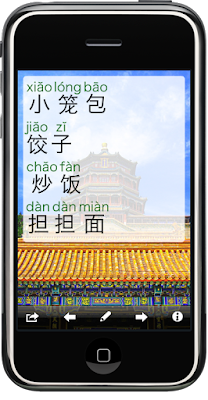
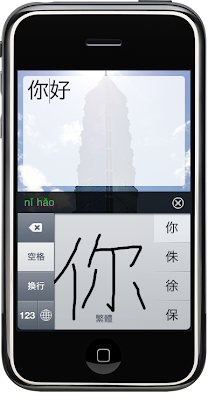
I'm happy to announce to releasing a couple of the Chinese Alphabet iPhone application. These are Chinese version of the Korean Alphabet I've released last week.

Simplified Chinese Alphabet

This tells how to read/pronounce Chinese characters used in the mainland China. You could read Chinese characters by Latin (Roman) alphabet notated.


Traditional Chinese Alphabet

This is the traditional, complex and old-styled, Chinese characters version which are used in Taiwan and Hong Kong.


Once I've got a taxi at Beijing, the driver could not understand the Great Wall I said. I hope the app would help such scenes.


Related Posts

iSWF - iPhone Appearance Simulator for Flash

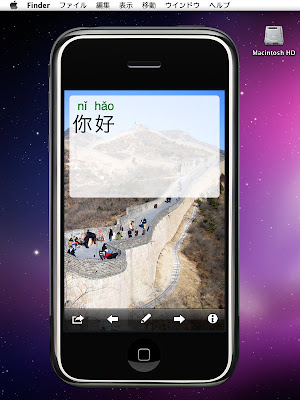
The iSWF is an appearance simulator for iPhone applications developed by Flash. This helps you to develop iPhone app and take its screen capture on your Mac.

Get iSWF from Google Code:
http://code.google.com/p/kawanet/downloads/detail?name=iSWF-20100227.zip


1. Install iPhone SDK

At first, get and install the iPhone SDK from Apple:
http://developer.apple.com/iphone/

"iPhone SDK 3.1.3 with Xcode 3.1.4" for 10.5 (Leopard) users,
"iPhone SDK 3.1.3 with Xcode 3.2.1" for 10.6 (Snow Leopard) users.

After installing it, try to run iPhone Simulator located at:
/Developer/Platforms/iPhoneSimulator.platform/Developer/Applications

Important note, as you know, iPhone's Safari could not run Flash.

2. Install AIR 2.0 Beta SDK

Install AIR 2.0 Beta SDK as the next.
Note skip this step when you're already using CS5.

http://labs.adobe.com/downloads/air2.html
Click "Download for Macintosh (TBZ2, 17.9 MB)".

Unzip air2_b2_sdk_mac_020210.tbz2 and change the folder name as "AIK2.0" and move the folder to "/Applications/Adobe Flash CS4" . Check black "adl" icon at
/Applications/Adobe Flash CS4/AIK2.0/bin

3. Publish .swf

Publish your MyApp.swf using your CS4.
Flash Player 10, 320px width, 480px height and any frame rate.

4. Get iSWF package

Get the iSWF package from Google Code:
http://code.google.com/p/kawanet/downloads/detail?name=iSWF-20100227.zip

Unzip the archive and move its contents to the folder of MyApp.swf. Then double click iSWF.command to run MyApp.swf. You would see the appearance simulator running as the first picture of the post.

Copy each three files of iSWF to any other your .swf project.

5. How it works?

The iSWF runs the most recent changed .swf file in the same folder. It's quite simple. See the iSWF.html. The iSWF uses the same appearance of Apple's iPhone Simulator. This means iSWF could not run on Windows which Apple doesn't care for.

6. ActionScript for iPhone

Flash application for iPhone is based on AIR technology. The iSWF, however, runs the app in the localTrusted sandbox. And also multi-touch, GPS, File class and iPhone's native keyboard are not avaible with iSWF. Wait CS5 released for you to start such developments.

(※日本語版の解説はコチラを参照ください)

AIR 2.0 Document:
http://help.adobe.com/en_US/FlashPlatform/beta/reference/actionscript/3/

Flash Player 10.1 ActionScript 3.0 Document:
http://help.adobe.com/en_US/air/reference/html/